Record match decisions
Not every bout is decided on points. The score editor records the kendo outcomes described here. Open the score editor from the Scores tab on a competition page, or from a match card in the court console (refer to Score a match).
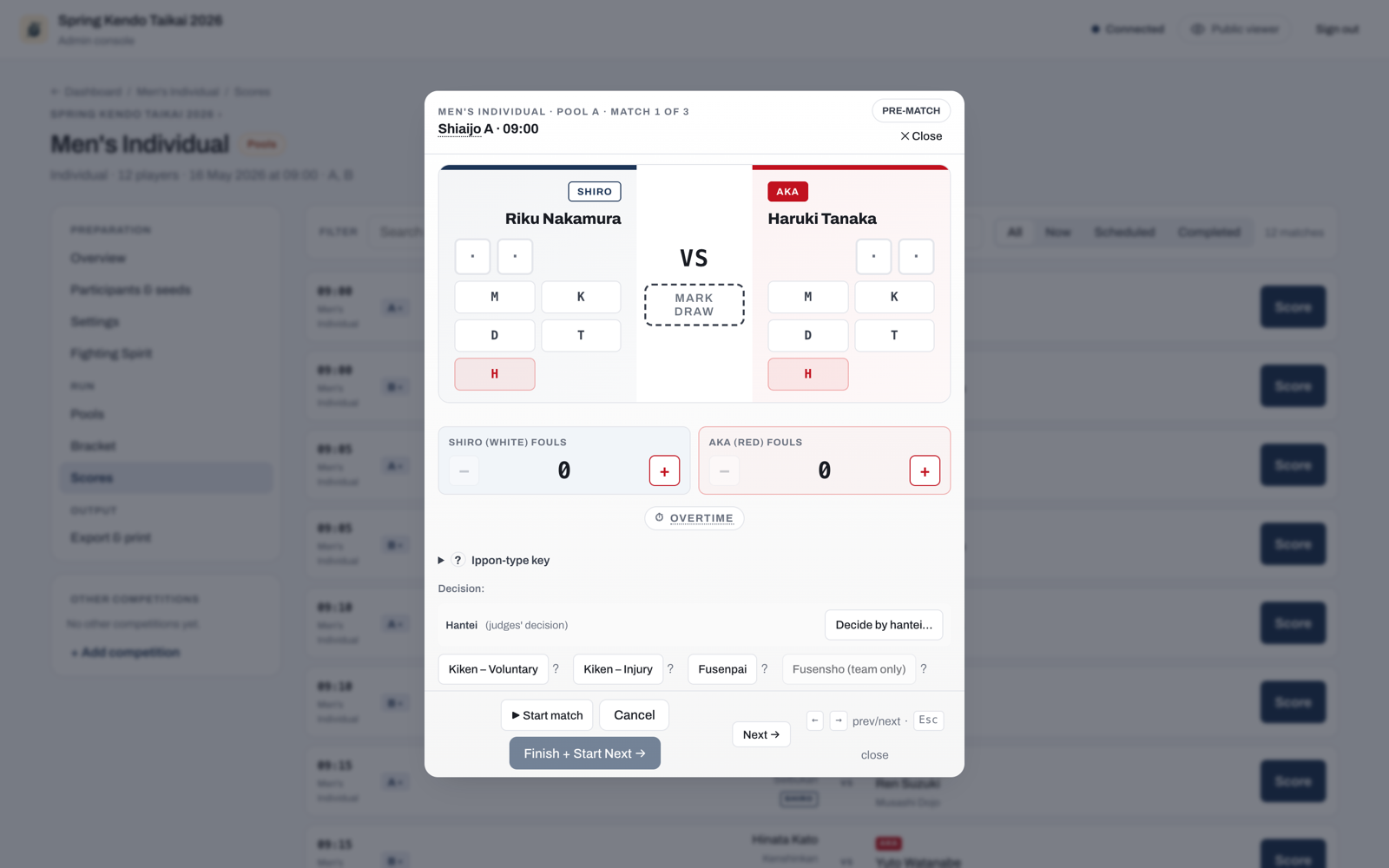
Kiken (withdrawal)
Kiken covers two distinct situations with different consequences.
Pick the side that withdrew: no side is chosen for you, and Record stays unavailable until you pick one. Once you do, the button names it (for example Record: AKA withdrew) and a line beneath says who cannot fight again and who wins the match.
Voluntary withdrawal (FIK Article 31)
A voluntary kiken is permanent. The competitor takes no further matches in this competition and cannot be reinstated.
Injury withdrawal (FIK Article 30)
An injury kiken can be reinstated later by the operator if the competitor recovers and is fit to continue. Until reinstated, the competitor is blocked from starting any further match.
Fusenpai and fusensho
Fusenpai is the no-show decision: the competitor who did not appear forfeits the match.
Pick the side that did not show up: no side is chosen for you, and Record stays unavailable until you pick one. Once you do, the button names it (for example Record: SHIRO did not show up).
Fusensho is used in team matches when the opposing team fields a vacant position, awarding that bout to the other side. It is also the decision the app records for the match itself when you record the win for the opponent of an already-barred competitor; refer to Matches after a competitor is barred. When neither team has a fighter for a position, record that bout as a Tie instead.
A kiken, fusenpai, or fusensho awards the winner the match points without a technique, and each awarded point is recorded as a circle. This follows the FIK Regulations of Kendo Shiai and Shinpan (Article 32 and the score board appendix). The winner's score shows two circles, or a single circle during overtime, when only the one deciding point is awarded. Any point the withdrawing side had already scored stays valid and is kept on the sheet. In a team match, the sub-bouts already fought are preserved and still count toward the standings.
To undo a per-bout fusensho, tap the pressed Fusensho button again. The circles are removed and any point already scored stays. To correct a point the other side scored, tap that mark to remove it: the fusensho stays. Fusensho cannot be given to a side whose opponent has already won the bout with two points: the button is greyed out, and tapping it shows why. Clear those points first if the bout was not really won, undoing that opponent's own fusensho first if it has one.
When a kiken, fusenpai, or fusensho decides a regular team match, every bout that has no result yet is also credited to the other team, 2-0 each: one individual victory and two points, the same figures a fusensho bout scores. This shows up wherever the match does: the individual victories and points totals, the standings, the bout rows, and the exported workbook. Bouts already fought keep their own results. Kachinuki encounters are unaffected, because they end on whichever bout the operator chooses, not on every position being filled.
Hikiwake
A hikiwake is a draw. It applies in pool, league, and Swiss matches, and in the individual bouts of a team encounter in any phase. A knockout match itself cannot end in a draw. A hikiwake contributes to the standings separately from wins and losses. To record one, tap Mark draw between the two sides in the score editor; in a team encounter, tap Tie (hikiwake) on the bout's row.
Encho (overtime)
Encho is the extra period played when a match is level at the end of regulation and must still produce a winner. That is usually a knockout match, but an individual pool match can also go to encho when the tournament's rules call for it. A team pool encounter is not extended: a tie there is a draw, and teams still level on the pool standings play a daihyosen instead. Encho follows ippon-shobu rules: the first competitor to score wins.
An individual knockout match cannot be finished level. While the score is tied, the Finish button reads Needs a winner instead: fight encho, then record a hantei if the competitors are still level after it.
To record a hantei, tap Decide by hantei and pick the winning side. Each button names the side's colour and competitor, for example SHIRO (White) wins: Tanaka and AKA (Red) wins: Yamada. Then finish the match as usual: Finish (on the court console, Finish + Start Next) and tap it again to confirm, or Save correction when you are correcting a result. Picking a side on its own records nothing, so a slip of the thumb between the two buttons can be put right before anything is saved.
In the score editor, open the Overtime control and tick Encho started. A counter appears so you can record how many overtime periods were fought, using the + and - buttons. The counter starts at 1 and has no upper limit. How many periods are fought, and how a match still level after them is finally settled, is the shimpan's call. That may be a judges' decision for an individual bout, or a daihyosen for a team encounter. Record what actually happened on court, however many periods that took.
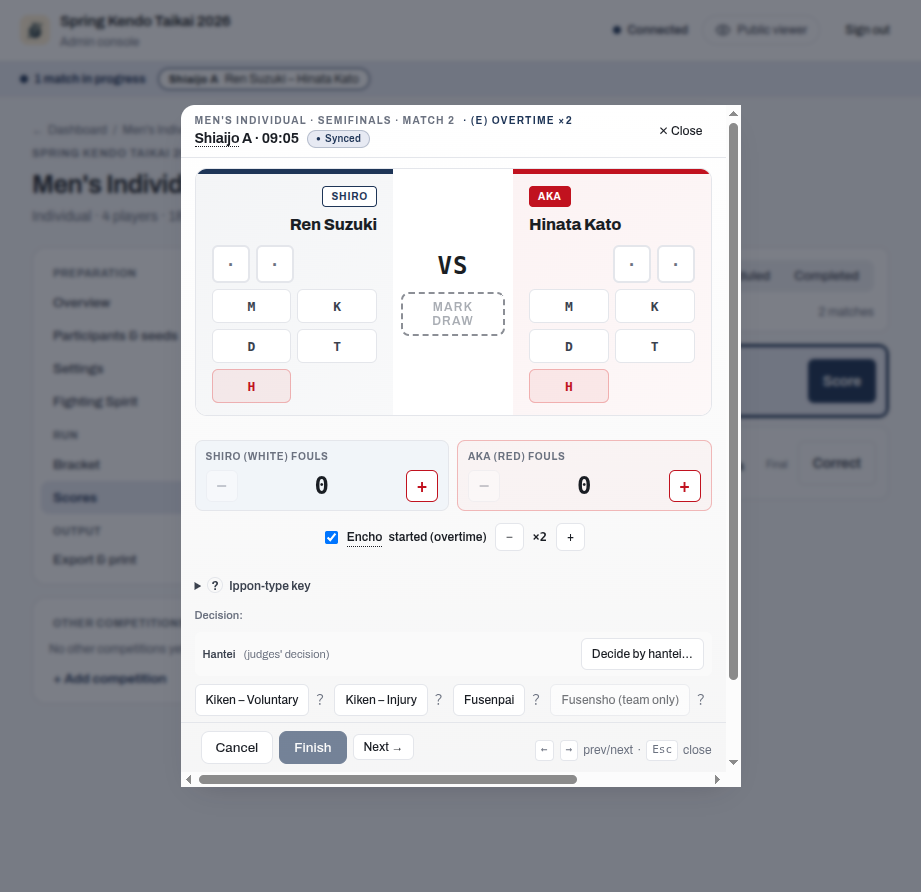
Completed results follow the paper score sheet's layout. The centre, between the two sides' points, only ever carries one mark: vs when no special mark applies, X for a tie, (E) for a match that went to overtime, or (DH) for a team encounter sent to a representative bout. The marks never combine: a match that went to encho cannot end in a tie, and a daihyosen has no overtime. A side with no points shows a plain dash. A match won by men in regulation reads M vs –, and the same win in overtime reads M (E) –, on the court console and the public viewer. The exported results workbook carries the same (E) marker in its centre column, but leaves a no-points cell blank rather than dashed. The marker is the same however many overtime periods were fought, because the counter records the number for the tournament log but results never show it.
Everything else is a result, written beside the competitor it names: Ht next to the winner of a judges' decision, Kiken next to the competitor who withdrew, Fus. next to a no-show, and also Fus. next to the winner when the match itself was decided by a fusensho. A match decided by hantei after a tied overtime reads M Ht (E) K, with the winner's mark on the winner's side of the centre. A team encounter shows its team totals in the score cell instead, so its marks sit where they happened. A bout's own mark (X, (E), or Ht for a representative bout decided by the judges) appears on that bout's row wherever the bouts are shown, such as the score editor, the match's page on the public viewer and the court display. A decision that settles the encounter is marked beside the team on the bracket and wherever the match is listed: Kiken beside a team that withdrew, Fus. beside a team that did not appear, and Fus. beside the winning team when the encounter was closed with a fusensho. On the bracket, the encounter also shows its winner with a tick, and (DH) when a representative bout decided it. The exported workbook carries each numbered bout's marks on its row, Kiken or Fus. beside the team's victory count, and X (a drawn encounter) or (DH) in the centre of the encounter's summary row; a knockout encounter's representative bout, with its Ht, is on the Representative Bouts sheet (refer to Daihyosen).
Daihyosen
A daihyosen is a representative bout used to break a tie when points and ranking criteria cannot separate two teams.
It applies in two situations:
- In the knockout phase, when a team encounter finishes level.
- In team pool or league play, when two teams finish equal on every ranking criterion and the tie decides who advances or how they are seeded.
A tie that does not affect advancement is left as a shared rank with no extra bout. In league play, running the daihyosen is the operator's choice rather than an automatic step; refer to Team standings and tie-breaks for both options.
The bout is a single-point ippon-shobu with no time limit, between one representative from each tied team. Because it runs until someone scores, a daihyosen has no encho. The score editor lets you pick each team's representative from its roster. On the court console, the bout appears with a (DH) mark in the centre of the score. In pool and league standings, the team that won its daihyosen carries a DH badge.
When a knockout team encounter is settled by a representative bout, the results workbook (Export & print, then Download results (.xlsx)) lists it on a Representative Bouts sheet, one section for each such encounter. A section is titled as that encounter is on the Elimination Matches sheet, followed by (Representative bout), with White (Shiro) on the left and Red (Aka) on the right. The bout's row shows DH where a numbered bout shows its number, then each team's representative with their number and name, the score, (DH) in the centre column, and the result mark (Ht, Kiken or Fus.) beside the side it names. A side whose representative was not picked shows no name. The sheet appears only when at least one encounter had a representative bout. The tie-break daihyosen of a team pool or league is not on it.
Chusen (drawing lots)
Chusen is the last resort when two or more tied teams have played a round of daihyosen and the bouts still do not produce a strict order. Examples are a cycle where each team beats another, an all-drawn round, or two teams finishing level on daihyosen wins.
When chusen is required, the Pools tab (labelled League for league competitions) shows a "Chusen (drawing lots) required" panel listing the tied teams. Draw lots offline, enter each team's finishing position in the panel, and record it to settle the order and let the competition advance.
In a competition with pools and then a knockout, the panel can also appear after the knockout has started, when a corrected pool result leaves a tie that only chusen can settle. The knockout match that the tied place feeds waits until you record the positions.
The positions you record decide who goes through. If they change who holds a qualifying place after the old holder has already fought a knockout match, the app asks first, in the same way as for a corrected pool result: it names who moves and which match was fought, and Apply and reopen records the positions and reopens that match for the new qualifier. If that knockout match is being fought right now, the positions are not recorded until it is finished or sent back to the queue. Refer to Correct a pool result after the knockout has started.
Chusen is the only place ranks are set by hand, and it happens only when the bouts themselves cannot decide the order.
Change a chusen recorded in the wrong order
After you record a chusen, the same tab shows a "Chusen (drawing lots) recorded" panel with the order you recorded, for example "Drawing lots: 1st Kyoto, 2nd Osaka, 3rd Nara". If you entered the order wrongly, select Change. The entry opens again with the recorded positions filled in. Enter the order the lots actually gave and record it, or select Cancel to leave the recorded order as it is.
A changed order can change who qualifies from the pool. The app treats it the same as a first chusen, and checks the new order as a whole, so it only asks about a team whose place actually changes: if a team moves out of a knockout match that has already been fought, it asks first, and Apply and reopen reopens that match for the new qualifier. If that match is being fought right now, the change is not recorded until the match is finished or sent back to the queue.
Competitor eligibility after a decision
A kiken or fusenpai marks the competitor who withdrew or did not appear as ineligible for further matches. The app blocks starting an ineligible competitor, so a withdrawn competitor cannot silently re-enter the draw. An injury kiken (FIK Article 30) can be reversed: once the operator reinstates the competitor, the eligibility block is lifted and they can fight again.
Matches after a competitor is barred
A barred competitor's other scheduled matches cannot be started, so the app steers everyone around them instead of leaving a dead entry in the queue. They are skipped by Up next, Finish + Start Next, the shiai-jo display's next line, the lobby view, and on-deck alerts, so nobody is nudged to warm up for a bout that cannot be fought. On the public schedule, the pools, and the bracket, the barred competitor's name carries a Withdrawn mark.
On the court console queue, the Scores tab, and the score editor, the match instead carries a note explaining why (for example "Kyoto withdrew: record the fusensho.") and a button naming the opponent, for example Record fusensho for Sato. One tap records the match as a fusensho for the opponent, without touching the barred competitor's eligibility record. For an injury kiken, a Reinstate button naming the barred competitor sits alongside it, restoring eligibility so the match can be fought instead. Once recorded, the match reads, for example, "Recorded: Fusensho for Sato. Kyoto had withdrawn.", with a Clear fusensho action if it was recorded by mistake: it reopens the match, back to the queue if the competitor is still barred (record the fusensho again, or reinstate them first; a match going back to the queue takes no court, so another match running on that court does not stop it), or back to in progress, ready to score, if they have since been reinstated.
Recording a kiken or fusenpai changes only that match. It does not do anything to the withdrawn competitor's other scheduled matches: each one shows its own notice and one-tap Record fusensho for <opponent> button, described above, when it comes up in the queue or you open it in the score editor. As with Finish + Start Next, the court console and the Scores tab then start the court's next match in the same competition, passing over the withdrawn competitor's own. The app never switches you to another competition or court by itself.
You can also open one of the competitor's other matches in the score editor and record Fusenpai for the barred competitor. The match records a fusenpai against them, and their eligibility record still names the match where they withdrew, so an injury kiken can still be reinstated. That match then offers Clear fusenpai, which works as it does for a fusensho: while the competitor is still withdrawn, the match goes back to the queue. Recording a second Kiken for a competitor who already withdrew elsewhere is refused: a competitor withdraws only once.
If both competitors due to meet are already barred, neither can fight. In a pool or league match, record it as drawn with Record as drawn (neither can fight): neither side receives a win or points. A knockout match has no equivalent, since the bracket needs a winner; correct the earlier withdrawal, or the draw, instead.
Clear kiken (or Clear fusenpai, whichever decision started the original withdrawal; refer to Correcting a withdrawal recorded by mistake) lists the later matches that were given a fusensho or fusenpai because of it, each with its pairing, so you know what is affected. The button reads Clear kiken and reopen (or Clear fusenpai and reopen) when nothing else currently bars the competitor; when something does, clearing this match only sends it back to the queue, so the button reads Clear kiken (or Clear fusenpai) alone, with no "and reopen" to promise. Two things can hold that bar: a later fusenpai still carrying the withdrawal forward, or the competitor being barred by a separate match entirely, for example an injury kiken that was reinstated and then a fresh kiken recorded on a different match; the box then says the competitor is still withdrawn because of another match, even though the match you are looking at still shows the old withdrawal. Those later matches keep their own decision. Reopen each of them individually: a later fusensho always reopens with Clear fusensho, to the queue if the competitor is still barred elsewhere or straight to in progress if not. A later fusenpai shows Clear fusenpai alone and goes to the queue while the earlier withdrawal still bars the competitor; once that bar is gone, whether because the earlier match was cleared or because the competitor was reinstated, the same button reads Clear fusenpai and reopen and puts the match straight back in progress.
Correcting a withdrawal recorded by mistake
A kiken or fusenpai entered in error can always be fixed. Open the match in the score editor. It shows what is recorded, for example "Recorded: Kiken – Voluntary, Kyoto withdrew", and marks the side that withdrew with Kiken or Fus. beside its name. In a team match the result under the team names, at the top of the score sheet, names the recorded winner and the decision, and the bouts after the withdrawal are credited to the other team, even though nobody actually fought them. Pick the fix that matches what happened:
- The wrong competitor or team was marked. Record the withdrawal again for the other side. In an individual match, use the Kiken – Voluntary, Kiken – Injury or Fusenpai button in the editor's Decision row. In a team match, open Withdrawal or no-show and use the same buttons there. The side you first marked is eligible again, and the other side becomes the one that withdrew. Nothing else changes: a competitor with a Fusenpai recorded on another match stays withdrawn because of that match, and matches already closed with a fusensho because of the first withdrawal keep it, so correct each of them one by one.
- Nobody withdrew, and the match was fought to a result. Choose Remove kiken, Remove fusenpai, or Remove fusensho: the button names the decision that was recorded. The editor takes that decision off the score board: its circles go, the points the withdrawn competitor struck stay, and you enter the result as it was fought, or a draw in a pool or league. In a team match, every bout needs a result, as when you finish one. Then use Save correction, which asks for a short reason like any correction. The match stays finished the whole time, so the fix never needs the court and a match being fought there carries on undisturbed. Undo puts the recorded decision back before you save; once the correction is saved on the device and waiting to be sent, it can no longer be undone this way. In a knockout match whose bouts were tied, a representative bout decided it: use Clear kiken and reopen (or Clear fusenpai and reopen) instead, which puts the match back on the court to fight it.
- Nobody withdrew, and there is more of the match to fight. Choose Clear kiken and reopen or Clear fusenpai and reopen, whichever was recorded. It takes one tap and needs no reason; the editor says what it will do beside the button. A kiken or fusenpai gives the opponent the match win, so without it the match was never decided. The match goes back to in progress and the editor stays open on it. The withdrawn competitor or team can compete again. Score the rest of the match and finish it as usual.
What the reopen keeps depends on the match:
- A team match keeps every bout already fought.
- An individual match keeps the points the withdrawn competitor had struck. It does not keep the winner's points. Recording the kiken or fusenpai replaced them with that decision's circles, and clearing it removes those circles, so enter the winner's points again before you finish. The same applies to a team's representative bout, which is scored in the individual editor, and it also keeps who fought it for each team. The editor says this beside the button, before you tap it.
A kachinuki team match that ended with a withdrawal or no-show shows the same Clear kiken and reopen (or Clear fusenpai and reopen) in place of its Reopen match button, because the reopen also makes the withdrawn team eligible again. A kachinuki match that ended any other way keeps Reopen match. A kachinuki match does not offer a Remove control: its result comes from the bouts as they are ended, so it is fixed by reopening it.
Removing a decision, either way, makes the withdrawn competitor or team eligible again, whichever kind of withdrawal it was, because a decision entered by mistake never happened. This includes a voluntary kiken, which otherwise cannot be reversed. The one exception is a competitor who also has a Fusenpai recorded on another match: they did not appear there either, so they stay withdrawn, now because of that match. Removing the decision still saves the result you enter; clearing and reopening it sends the match back to the queue instead of in progress. The editor says so beside the buttons, before you tap one. To say it, the editor first looks at the competitor's later matches, so both buttons stay unavailable for a moment (at most two seconds) when the editor opens.
Without removing the decision first, Save correction never removes a kiken or fusenpai. It saves the points or bouts you enter and keeps the decision, its winner and the competitor's eligibility as they were recorded. In an individual match the winner's circles for that decision are shown but cannot be changed. Only the withdrawn competitor's points can be corrected, and they are limited to one point, because a competitor with two points has already won the bout.
A fix can change who goes through to later matches, so the app warns you first and you can cancel or go ahead:
- Clearing a decision in a knockout match, or removing one so that the other competitor wins, warns you when the next match has already been played. If you go ahead, that next match is reopened with its winner cleared and its points kept, so check them and take back any that no longer apply, and the editor names it once the reopen is done. A round after it that nobody has played yet stops showing its winner. If a withdrawal decided that next match, its withdrawn competitor is eligible again too.
In a knockout, a next match that is still in progress must be finished or sent back to the queue before a decision can be cleared, removed in favour of the other competitor, or recorded for the other side. Clearing and reopening also needs this match's court: if another match is running there, the app names it and offers to send it back to the queue, which keeps any score entered for it. Removing the decision does not need the court.
In a pool of a competition that ends in a knockout, clearing a decision is not refused because of the knockout. Clearing it moves nobody in the bracket: the pool simply has an unfinished match again. Removing the decision saves the result straight away, so the check below runs as soon as you save. When you finish that match, the app checks whether the result changes who qualifies from the pool. The same result is saved as usual. A result that moves someone who has already fought in the knockout is handled like any pool correction: you are shown who moves and which knockout matches are affected before anything is saved. Refer to Correct a pool result after the knockout has started.
Matches that were already decided because of the withdrawal keep their own result; refer to Matches after a competitor is barred for how to list and correct them.